

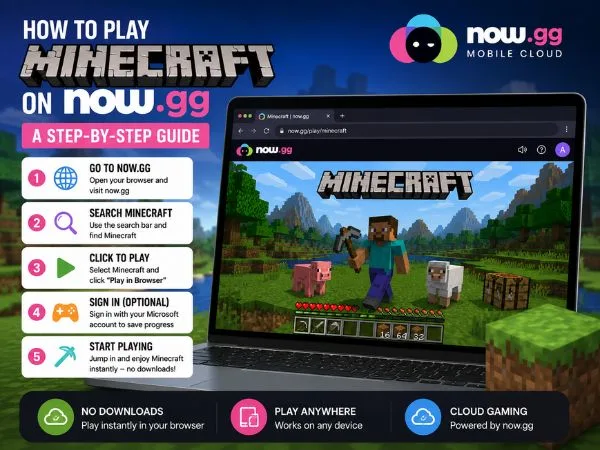

Play Minecraft on now.gg — Complete Guide
Want to play Minecraft on Now.gg without downloading? Follow our easy step-by-step guide to enjoy seamless cloud gaming on your browser or mobile device.
Minecraft is an evergreen survival sandbox game which is pretty to play whatever your age is. If you don’t have access to a PC or console while traveling or away from home, now.gg lets you play Minecraft from a browser — all you need is a device with a modern browser and a stable internet connection. Below is a clear, step‑by‑step guide to get you started, plus what to expect from controls, benefits, and a few caveats.
What is now.gg
now.gg is a cloud‑gaming platform focused on mobile games. Instead of installing apps, now.gg runs games in the cloud and streams them to your browser. The platform aims to simplify access for players and developers by removing device‑compatibility barriers and enabling instant play and social sharing. For Minecraft players, that means you can access the Android version of the game from laptops, tablets, or phones without downloading large files.
How to Play Minecraft on now.gg (Step‑by‑Step)
- Open now.gg in your browser.
Use a modern browser (Chrome, Edge, Firefox) and a reliable internet connection for the best experience. - Tap “Play in browser.”
The site launches an app‑player tab that streams the game to your device. - Allow downloads or updates if prompted.
The cloud player may prepare game assets or apply updates before you start. - Sign in with your Microsoft account.
Logging in lets you access your worlds, purchases, and multiplayer features where supported. - Start playing.
Once the player is ready you can jump into the trial or full experience offered through the streamed Android build.
also read : – Level Up Your Play: The Ultimate Guide to Google Play Games
Controls and Trial Experience
When you play the Android version through now.gg on a PC or laptop, you typically get keyboard and mouse controls, which are far more precise than touchscreen input. That makes building, combat, and navigation feel closer to the desktop experience. Keep in mind that the version available on now.gg is often the Android trial of Minecraft — it may be limited in time or features compared with a full desktop or console edition.
Advantages of Playing Minecraft on now.gg
- No installation required. Play instantly from the browser without using local storage.
- Cross‑device access. Use a laptop, tablet, or phone to play when your main PC isn’t available.
- Keyboard and mouse support. On laptops and desktops you can enjoy better precision than on touchscreens.
- Good performance on many devices. now.gg streams the game, so even modest hardware can run Minecraft smoothly if your internet is stable.
- Fast setup and sharing. The platform is designed for quick access and easy sharing of game links.
Concerns and Limitations
- Trial limitations. The streamed build is often the Android trial; it may expire or restrict features.
- Internet dependency. A strong, low‑latency connection is essential; lag or packet loss will affect gameplay.
- Possible control differences. Some advanced PC features or mods may not be available in the streamed Android build.
- Account and save behavior. Verify how now.gg handles saves and account sync so you don’t lose progress when switching devices.
Practical Tips for Best Experience
- Use a wired or strong Wi‑Fi connection to reduce latency.
- Close background apps that consume bandwidth before streaming.
- Log into your Microsoft account to keep worlds and purchases accessible.
- Test controls first in a safe world to confirm key mappings and responsiveness.
- Expect occasional updates or prompts from the cloud player; allow them to finish before starting long sessions.
Final Words
now.gg makes Minecraft more accessible when you can’t use your usual PC or console. It’s a convenient way to play on the go, try the Android trial with keyboard and mouse, and avoid large downloads. Just remember the tradeoffs: internet reliance and possible trial limits. If you follow the setup steps and use a stable connection, now.gg can be a smooth, practical way to enjoy Minecraft away from your main machine.
also read : – Insomniac Games Reveals Marvel’s Wolverine PS5 Release Date
Conclusion
We hope this guide helps you play Minecraft on now.gg with confidence. Enjoy building, exploring, and surviving — wherever you are. Thanks for reading.